
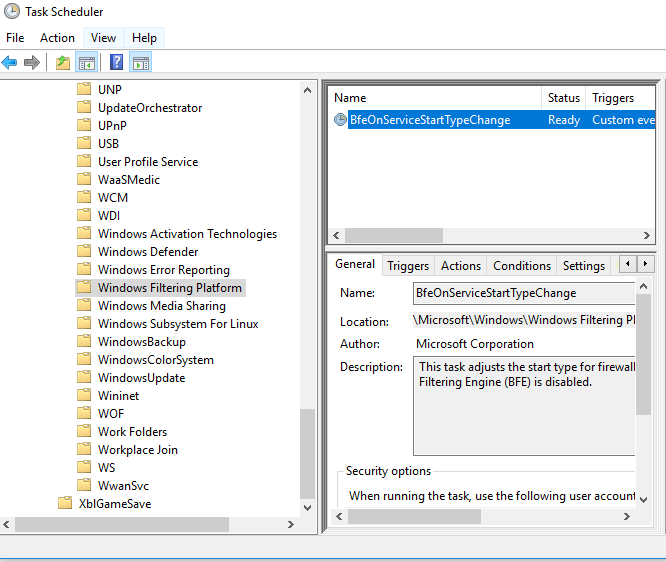
Activare Windows Filtering Platform din Task Scheduler Data 25/11/2018 Autor Daniel Chr Categorie Configurare Sistem de operare, OS - Windows, Soluții, Stații de lucru -7 1078 Configurare noua (How To) SituatieCum activam Windows Filtering Platform din Task Scheduler? Solutie Pasi de urmat Deschidem Task Scheduler din Start. Mergem pe calea Microsoft > Windows > Windows Filtering Platform Deschidem BfeOnServiceStartTypeChange si din sectiunea Triggers, setam cand acesta sa ruleze. Tip solutiePermanent Etichetare: activare Windows Filtering Platform Voteaza Up Down (27 din 60 persoane apreciaza acest articol) ShareTweetShare Despre Autor Daniel Chr Solutii Asemanatoare How to clean temporary files on Windows 11 -3 Cum deschidem un RDP in full screen folosind Command Prompt in Windows 10 2 Cum deschidem fereastra Sound folosind Run in Windows 10 4 How to enter text with your voice on a Chromebook 11 Can’t Delete a Windows File or Folder? 2 Top 10 Linux Easter Eggs 4 Leave A Comment? × Cancel Reply Save my name, email, and website in this browser for the next time I comment. 9 + = eleven
Leave A Comment?