
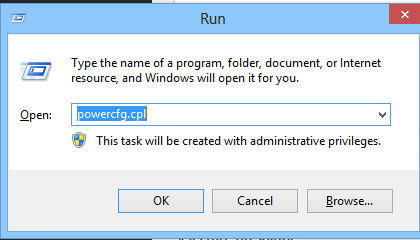
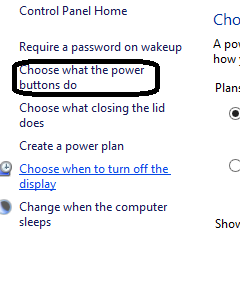
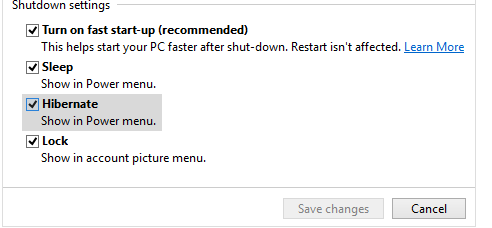
Activarea optiunii Hibernate in Power Options Data 09/12/2015 Autor Cristian V Categorie OS - Windows, Stații de lucru, Configurare Sistem de operare 6 1400 Rezolvare problema (Fix IT) SituatieDorim activarea optiunii Hibernate in Power Options Solutie Pasi de urmat Apasam Win+R si scriem powecfg.cpl Selectam optiunea Choose what the power buttons do Selectam optiunea Change settings that are currently unavailable Optiunea Hibernate va fi nebifata. O bifam si astfel Hibernate va aparea in Power Menu Tip solutiePermanent Voteaza Up Down (31 din 56 persoane apreciaza acest articol) ShareTweetShare Despre Autor Cristian V Solutii Asemanatoare How to clean temporary files on Windows 11 -4 Cum deschidem un RDP in full screen folosind Command Prompt in Windows 10 2 Cum deschidem fereastra Sound folosind Run in Windows 10 4 Cum pot activa modul Dark in Microsoft Office? -1 Cum pot rezolva problema cu conexiunea la retea in Windows 10? 2 Reducerea deseurilor rezultate din echipamente electronice (e-waste): corectarea software a disfunctionalitatilor butoanelor perifericelor -3 Leave A Comment? × Cancel Reply Save my name, email, and website in this browser for the next time I comment. six − three =

Leave A Comment?