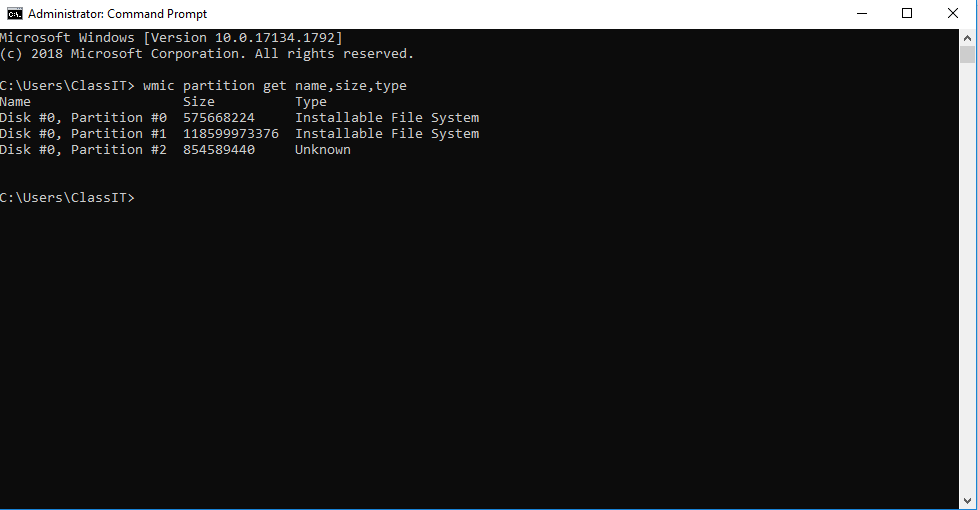
Cum afisam partitiile unui hdd cu ajutorul WMIC Data 29/10/2020 Autor Costinel Cirstea Categorie OS - Windows, Soluții -4 445 Configurare noua (How To) SituatieDorim sa verificam starea partitiilor unui hdd. Solutie Pasi de urmat Intram in start si scriem cmd, apoi il rulam cu drepturi de administrator: Rulam comanda: wmic partition get name,size,type Tip solutiePermanent Voteaza Up Down (9 din 22 persoane apreciaza acest articol) ShareTweetShare Despre Autor Costinel Cirstea Solutii Asemanatoare How to clean temporary files on Windows 11 -6 Cum deschidem un RDP in full screen folosind Command Prompt in Windows 10 1 Cum deschidem fereastra Sound folosind Run in Windows 10 1 How to enter text with your voice on a Chromebook 8 Can’t Delete a Windows File or Folder? 1 Top 10 Linux Easter Eggs 7 Leave A Comment? × Cancel Reply Save my name, email, and website in this browser for the next time I comment. 4 − = 2
Leave A Comment?