
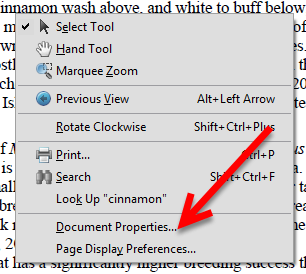
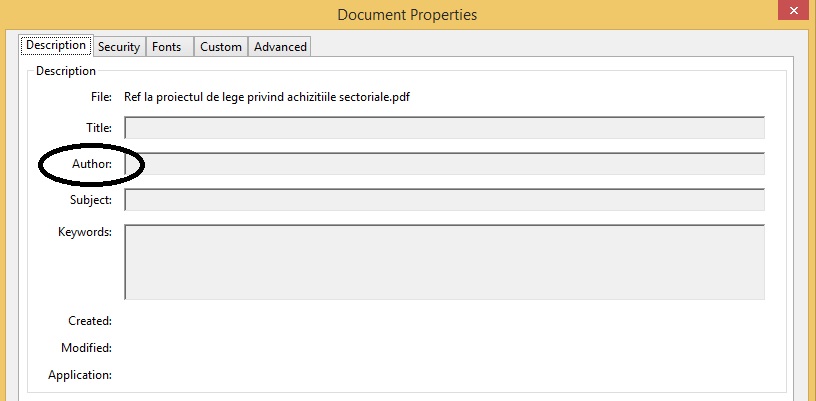
Cum putem vedea autorul unui PDF Data 04/11/2015 Autor Mihnea I Categorie Aplicatii specifice, Stații de lucru -2 1722 Configurare noua (How To) SituatieVrei sa vezi cine a creat un PDF Solutie Pasi de urmat Deschidem documentul PDF dorit pentru a aflat autorul acestuia Dam clic dreapta oriunde in documentul pdf Si selectam “Document Properties” In primul tab “Description” putem vedea autorul documentului: Tip solutiePermanent Voteaza Up Down (31 din 64 persoane apreciaza acest articol) ShareTweetShare Despre Autor Mihnea I Solutii Asemanatoare How to clean temporary files on Windows 11 -3 Cum deschidem un RDP in full screen folosind Command Prompt in Windows 10 2 Cum deschidem fereastra Sound folosind Run in Windows 10 4 Cum pot activa modul Dark in Microsoft Office? -1 Cum pot rezolva problema cu conexiunea la retea in Windows 10? 2 Reducerea deseurilor rezultate din echipamente electronice (e-waste): corectarea software a disfunctionalitatilor butoanelor perifericelor -3 Leave A Comment? × Cancel Reply Save my name, email, and website in this browser for the next time I comment. − three = five
Leave A Comment?