
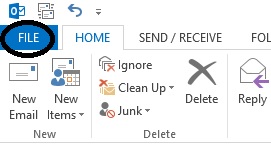
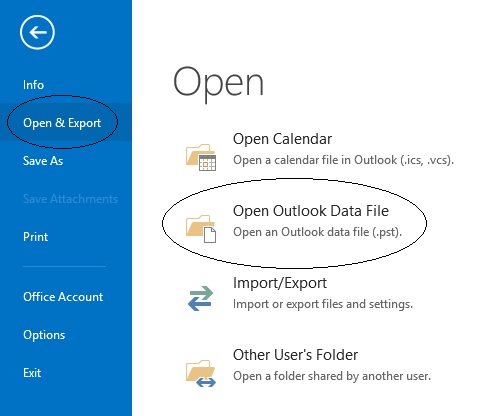
Cum sa atasezi o arhiva (*.pst) in Oultook 2013 Data 15/04/2015 Autor Mihnea I Categorie E-mail, Aplicații, Importare / exportare email -12 1335 Configurare noua (How To) SituatieDoresti sa atasezi o arhiva in outlook 2013 Solutie Pasi de urmat Deschidem Outlook 2013 si apasam pe butonul “File” aflat sus in dreapta: In fereastra noua apasam pe “Open & Export” dupa care selectam din partea dreapta “Open Outlook Data File”: In fereastra urmatoare selectam arhiva dorita si apasam butonul “Ok”: Tip solutiePermanent Voteaza Up Down (22 din 56 persoane apreciaza acest articol) ShareTweetShare Despre Autor Mihnea I Solutii Asemanatoare O metoda de vizualizare a valorii frecventelor orizontale si verticale de reimprospatare a imaginii in Windows 6 Adding emotes to a personal Twitch channel 2 How to stop awkward Games showing up on next year’s Steam replay -2 How to use LAMBDA in Excel to create your own functions -3 How to customize the Always-on Display on a Samsung Galaxy Phone -5 How to create a New File in macOS Finder 6 Leave A Comment? × Cancel Reply Save my name, email, and website in this browser for the next time I comment. nine − 2 =
Leave A Comment?