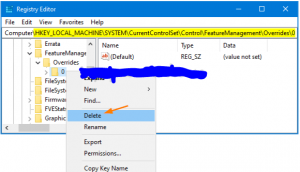
Cum sa dezactivezi noul meniu de start din Windows 10 versiunea 2004 Data 12/11/2020 Autor Gabriel Burtea Categorie OS - Windows, Stații de lucru, Configurare Sistem de operare, Depanare 14 1171 Configurare noua (How To) SituatieDoresti sa revii la meniul de start vechi. Solutie Deschidem regedit cu drepturi de administrator (start – cautare regedit – deschidere regedit.exe prin click dreapta, run as administrator) Navigam in calea: HKEY_LOCAL_MACHINE\SYSTEM\CurrentControlSet\Control\FeatureManagement\Overrides Click dreapta pe “0” si “Delete” Dam restart la calculator. Tip solutiePermanent Voteaza Up Down (46 din 80 persoane apreciaza acest articol) ShareTweetShare Despre Autor Gabriel Burtea Solutii Asemanatoare How to clean temporary files on Windows 11 -3 Cum deschidem un RDP in full screen folosind Command Prompt in Windows 10 2 Cum deschidem fereastra Sound folosind Run in Windows 10 4 Cum pot activa modul Dark in Microsoft Office? -1 Cum pot rezolva problema cu conexiunea la retea in Windows 10? 2 Reducerea deseurilor rezultate din echipamente electronice (e-waste): corectarea software a disfunctionalitatilor butoanelor perifericelor -4 Leave A Comment? × Cancel Reply Save my name, email, and website in this browser for the next time I comment. seven − = zero
Leave A Comment?