
Follow Us

Soluții pentru problemele tale IT

Home /Stații de lucru/OS - Windows/Cum setam Win 8.1 sa faca sign in direct pe Desktop, nu in Start Screen

Cum setam Win 8.1 sa faca sign in direct pe Desktop, nu in Start Screen

  • Data 11/07/2016
  • Autor Cristian V
  • Categorie OS - Windows
  • 0
  • 1874
Configurare noua (How To)

Situatie

Dorim ca, dupa ce ne logam, Win 8.1 sa afiseze direct desktopul, nu clasicul Start Screen

Solutie

Pasi de urmat

In Start Screen cautam Navigation si selectam Navigation Properties
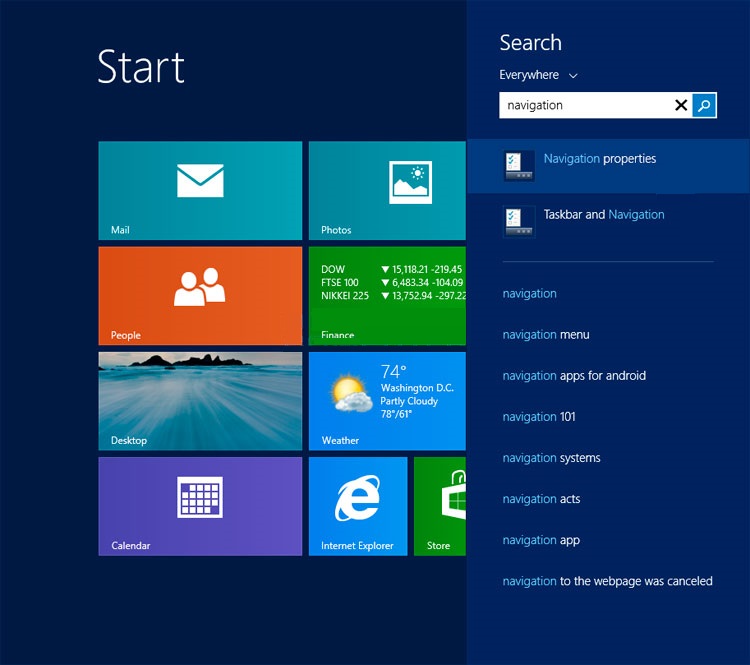
navigation-search

Bifam When I sign in or close all apps on a screen, go to the desktop instead of Start
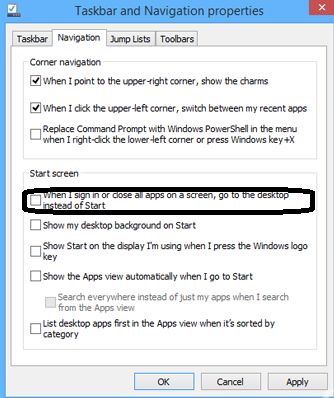
Capture

Tip solutie

Permanent
Etichetare: askitaskit.roCum setam Win 8.1 sa faca sign in direct pe DesktopdesktopNavigation Propertiesnu in Start ScreenStart ScreenWin 8.1

Voteaza

Up Down
(19 din 38 persoane apreciaza acest articol)
Share
Tweet
Share

Despre Autor

Cristian V

Solutii Asemanatoare

  • How to clean temporary files on Windows 11 -3
  • Cum deschidem un RDP in full screen folosind Command Prompt in Windows 10 2
  • Cum deschidem fereastra Sound folosind Run in Windows 10 4
  • Cum pot activa modul Dark in Microsoft Office? -1
  • Cum pot rezolva problema cu conexiunea la retea in Windows 10? 2
  • Reducerea deseurilor rezultate din echipamente electronice (e-waste): corectarea software a disfunctionalitatilor butoanelor perifericelor -3

Leave A Comment? × Cancel Reply

29534

Soluții Disponibile

0 Articole

In ultima saptamana

Cele mai recente soluții

  • How to clean temporary files on Windows 11
    • 777
    • 17/04/2025
  • How to update iOS on your iPhone
    • 701
    • 17/04/2025
  • Cum deschidem un RDP in full screen folosind Command Prompt in Windows 10
    • 652
    • 16/04/2025
  • Cum deschidem fereastra Sound folosind Run in Windows 10
    • 473
    • 16/04/2025
  • How to enter text with your voice on a Chromebook
    • 872
    • 16/04/2025
© Askit.ro, 2014 - 2026. All rights reserved. Done by Class IT
Share
Tweet
Share