
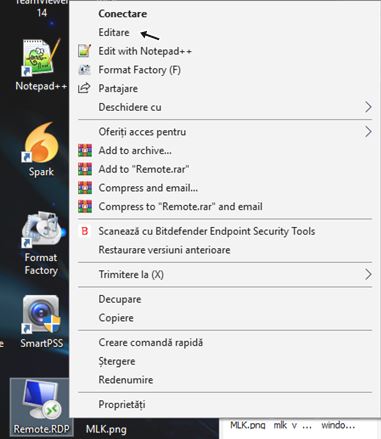
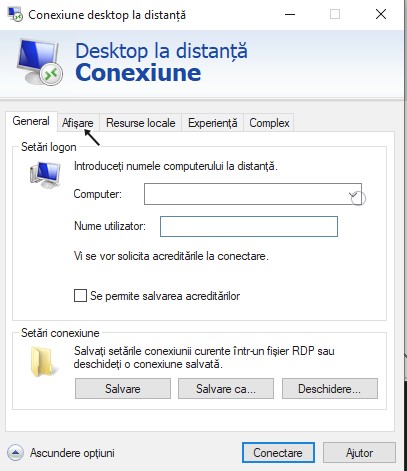
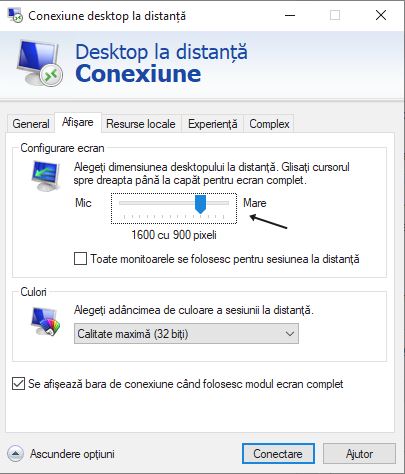
Cum utilizezi Remote Desktop Connection in full screen Data 05/04/2019 Autor iulian carp Categorie Soluții -9 1091 Configurare noua (How To) SituatieAvem nevoie sa utilizam Remote Desktop Connection in full screen. Solutie Pasi de urmat Dam un click dreapta pe iconita noastra de remote si selectam EDITARE. S-au deschis optiunile pentru RD, mergem la optiunea AFISARE. La configurare ecran, tragem sageata la maxim spre dreapta. Revenim la tabul GENERAL si salvam setarile. Tip solutiePermanent Etichetare: Connectiondesktopfullremotescreen Voteaza Up Down (26 din 61 persoane apreciaza acest articol) ShareTweetShare Despre Autor iulian carp Solutii Asemanatoare Cum deschidem un RDP in full screen folosind Command Prompt in Windows 10 1 Cum deschidem fereastra Sound folosind Run in Windows 10 2 How to enter text with your voice on a Chromebook 12 Can’t Delete a Windows File or Folder? -1 Top 10 Linux Easter Eggs 3 How to fix – Reading a File: Permission Denied on Linux 11 Leave A Comment? × Cancel Reply Save my name, email, and website in this browser for the next time I comment. × eight = seventy two
Leave A Comment?